

 MCP
What are milestones?
Milestones are called achievements in the Trophy API, SDKs and webhooks. For example, see the all achievements endpoint and the
achievement.completed webhook. Field and endpoint names keep the achievement naming.Milestone types
Trophy offers five types of milestones, Metric, API, Streak, Anniversary and Composite milestones, detailed below.Metric milestones
Metric milestones are tied to Metrics and are best used when you want to incentivize users to take the same action over and over again. Let’s take the example of a study platform that uses Trophy to encourage users to view more flashcards with metric milestones as follows:- 1,000 flashcards
- 2,500 flashcards
- 5,000 flashcards
- 10,000 flashcards
- 25,000 flashcards
- 50,000 flashcards
Response
API milestones
API milestones can only be completed once and are useful for rewarding users for taking specific actions. Common examples include:- A user completing their profile after signing up
- A user linking their social account to a platform
- A user sharing their product experience on social media
Streak milestones
Streak milestones are directly tied to a user’s Streak and are automatically unlocked when users reach a particular streak length. You can create as many streak milestones as you like for increasing lengths of streak, for example 7 days, 30 days and 365 days to motivate users to use your app more and more. Just like metric and API milestones, you can add a custom name and assign a badge to streak milestones.Anniversary milestones
Anniversary milestones unlock automatically when a user reaches a specific anniversary of their sign-up date. Create one milestone for each year you want to celebrate, for example 1 year, 2 years and 5 years. Trophy unlocks each milestone when the user’ssignUpDate plus that number of years is reached.
Users without a signUpDate are not eligible. Set signUpDate when you identify or update users so Trophy can detect anniversaries.
Trophy evaluates the anniversary on the calendar day in the user’s tz. Set tz so the milestone unlocks on the correct local day.
Just like other milestone types, anniversary milestones can trigger milestone emails when unlocked.
Composite milestones
Composite milestones unlock automatically when a user has completed all of the prerequisite milestones you select. They’re ideal for creating tiered or mastery-level rewards that recognize users who have accomplished a specific set of milestones. For example, you could create a “Study Master” composite milestone that unlocks when a user has completed:- 1,000 flashcards
- 7-day streak
- Complete onboarding
Creating milestones
To create new milestones, head to the milestones page in the Trophy dashboard and click the New milestone button:1
Enter a name
Enter a name for the milestone. This will be returned from APIs and made available for use in emails and other areas of Trophy where appropriate.
2
Enter a description (Optional)
Enter a short description of the milestone. This will be returned from APIs
and made available for use in emails and other areas of Trophy where
appropriate.
3
Add a badge (Optional)
You can add a badge by uploading an image or by entering a custom image URL.
The URL is returned in API responses and used in emails and other areas of
Trophy where appropriate.
4
Choose a trigger type
Choose how you want this milestone to be unlocked.
- Choosing Metric will mean the milestone will be automatically unlocked when the user’s metric total reaches the milestone trigger value.
- Choosing Streak will mean the milestone will be automatically unlocked when the user’s streak length reaches the milestone trigger value.
-
Choosing Anniversary will mean the milestone will be automatically unlocked when the user reaches the specified anniversary of their
signUpDate. - Choosing API Call will mean the milestone will only be unlocked when explicitly marked as completed by your code through a request to the complete achievement API.
- Choosing Composite will mean the milestone will be automatically unlocked when the user has completed all of the prerequisite milestones you select.
5
Set up trigger
Once you’ve chosen the trigger type for the milestone, you need to set up the trigger settings.
- If you chose the Metric trigger, you’ll need to choose the metric and the user’s total value that should unlock the milestone when reached.
- If you chose the Streak trigger, you’ll need to set the streak length that should unlock the milestone.
- If you chose the Anniversary trigger, you’ll need to set the number of years after sign-up that should unlock the milestone.
-
If you chose the API Call trigger, you’ll need to choose a unique reference
keyyou’ll use to complete the milestone via the API. - If you chose the Composite trigger, you’ll need to select the prerequisite milestones that must all be completed for this milestone to unlock. The composite milestone will automatically unlock when a user completes the final prerequisite.
6
Add attribute filters (Optional)
You can assign attribute filters to a milestone to further restrict who can unlock them and when.
- To limit a Metric milestone to only apply to events with specific custom event attributes, add one or more filters in the Event Attributes section.
- To limit any type of milestone to only apply to a user with one or more specific custom user attributes, add attributes and the desired values in the User Attributes section.
When you set multiple event attribute filters, all of them must match for the
metric milestone to apply. In API responses,
eventAttributes is the
canonical field and eventAttribute is deprecated for legacy compatibility.7
Click save
Save the new milestone.
Managing milestones
Trophy has built in tools to help you test and control which milestones can be unlocked, by who and when, without affecting production.Milestone statuses
Here’s an overview of the different milestone statuses and what they mean. Inactive All milestones are created as inactive. Inactive milestones can’t be completed and aren’t returned in any milestone APIs. Users won’t see them until you make them active. Active When you make a milestone active, it makes it ‘live’. Users can complete it and it will be returned from all milestone APIs. Locked When you lock a milestone, users who haven’t unlocked it yet won’t be able to unlock it anymore, but users who have already unlocked it won’t be affected. Locked milestones are only returned in APIs for users who have already achieved them.Milestone workflow
Milestones can be moved through different statuses according to the following workflow:Completing milestones
If you’re using metric milestones, there’s no need to explicitly complete milestones. Once you’ve set up metric tracking in your code, all milestones linked to the metric will be automatically tracked. Similarly, if you’re using streak milestones, all milestones related to the user’s streak will automatically be unlocked when a user reaches the respective streak length. Anniversary milestones are also completed automatically. They unlock when a user reaches the configured anniversary of theirsignUpDate. Users without a signUpDate cannot unlock them.
Composite milestones are also completed automatically. They unlock as soon as a user has completed all of their prerequisite milestones. No additional API calls are needed.
However if you’re using any API milestones, you will have to mark them as completed for each user as appropriate. To do this, you can use the Complete Achievement API using the key of the milestone you want to complete.
This will return back a response that contains details of the milestone that was completed that can be used in any post-completion workflows, like showing an in-app notification.
Response
Backdating milestones
By default, whenever you move a milestone to ‘Active’ status, Trophy will check if any existing users meet the requirements of the milestone and complete it for them behind the scenes. This means when you release new milestones into production, or edit an existing live milestone, backdating will happen automatically. The same applies when you set or change a user’ssignUpDate. If the user already qualifies for any active anniversary milestones, Trophy completes them silently.
When milestones are completed in this way, users don’t receive any
notifications this has happened. This is to prevent changes to your
milestones in Trophy resulting in users getting lots of notifications.
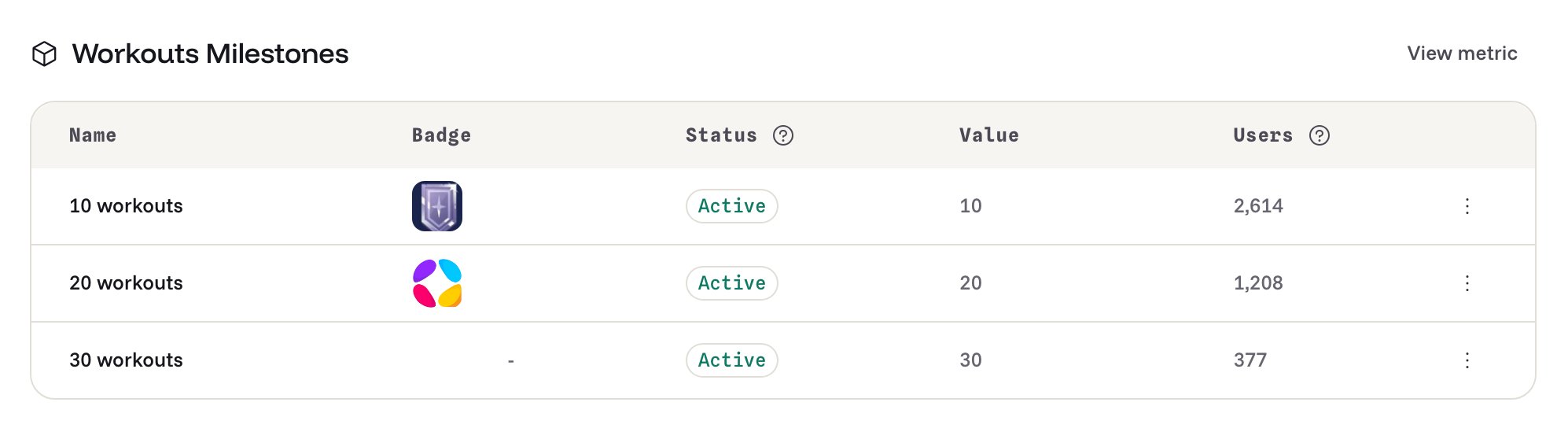
Using badges
badgeUrl for use as the src on <img> tags.
Response
Displaying milestones
Trophy has a number of APIs that support displaying milestones within your applications. Here we’ll look at the different ways to use them and the types of UI’s you can build.All milestones
To display a high-level overview of all milestones users can complete, use the all achievements endpoint. Use this data to build UI that gives users an idea of the progression pathways within your application.completions (the number of users who have completed the milestone) and rarity (the percentage of users who have completed the milestone) as follows:
Response
User milestones
If instead you’re building user-specific UI elements, then use the user achievements endpoint to return milestones a specific user has completed.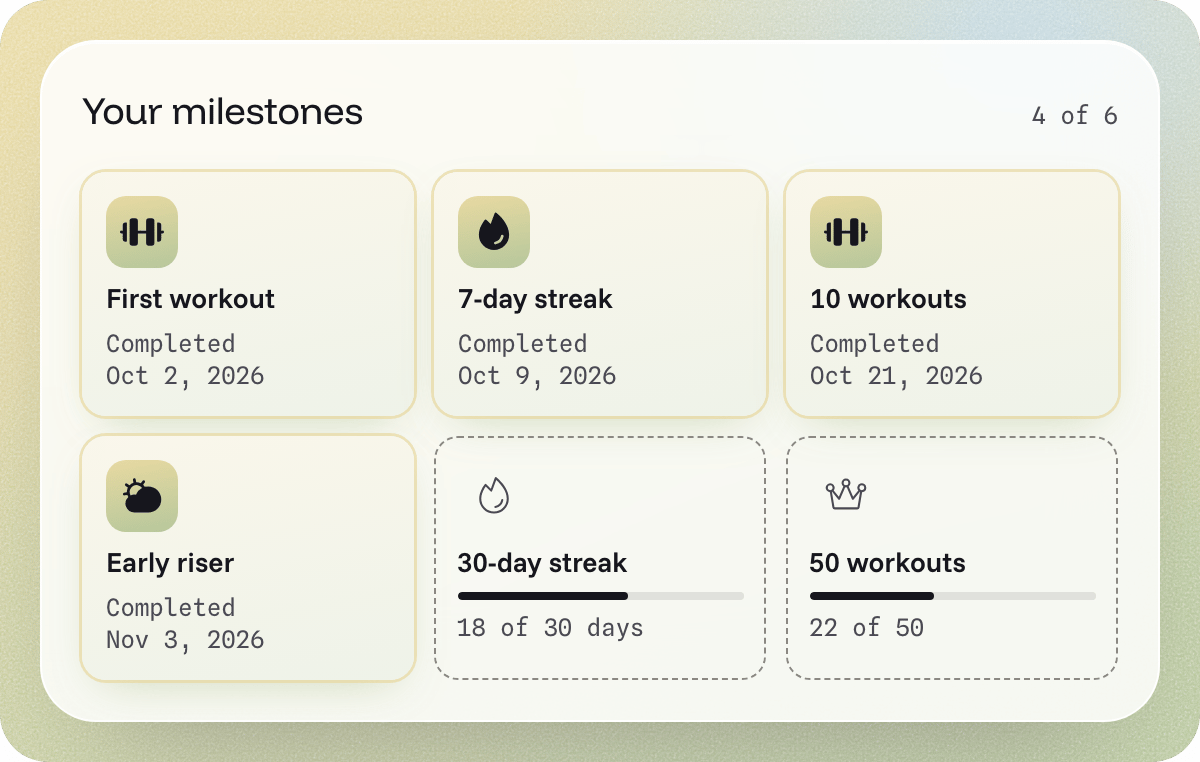
Milestone analytics
If you have milestones set up for any of your Metrics, then the metric analytics page displays a chart that shows you the current progress of all Users as follows: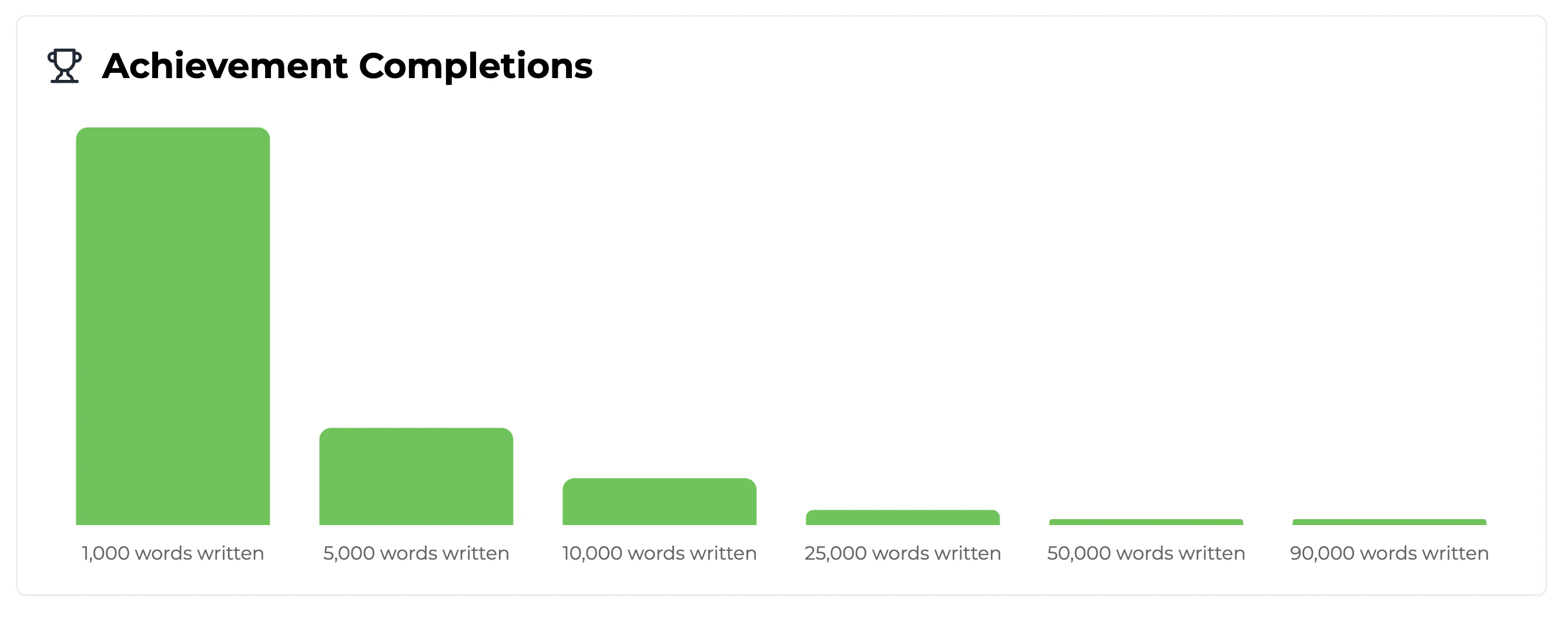
Frequently asked questions
What type of milestones should I use?
What type of milestones should I use?
Use metric milestones for rewarding users for taking the same action over and over again, and to incentivise them to do it more.Use streak milestones for rewarding users for keeping their streak.Use anniversary milestones for rewarding users for remaining on your platform over time.Use API milestones when you want to reward users for taking specific actions that they only need to take once.Use composite milestones when you want to create tiered or mastery-level rewards that unlock when users complete a specific set of prerequisite milestones.
What milestones should I create?
What milestones should I create?
Milestones offer the best retention when tightly aligned to the user’s core reason for using your platform.Use Trophy’s metric analytics to compare the retention of each user interaction, then configure milestones around these interactions to maximize retention impact.